Classic PC Theme
- 5.0
- Rating
- 10.00K
- Installs
- Free
- Price

 Analysis by App-foxy
I spent time with Classic PC Theme as a small but surprisingly noticeable customization for AnySoftKeyboard, and its appeal became clear almost immediately: it changes the visual character of the keyboard without trying to replace the keyboard itself. Instead of adding a new writing system, a large feature set, or a separate typing environment, it focuses on one verified capability—the old-school computer-key appearance—and lets that visual choice shape everyday typing.
That narrow purpose is important. Classic PC Theme is an app in the Libraries & Demo category, developed by AnySoftKeyboard, and it is free to use. It is aimed at people who already use AnySoftKeyboard and want its keys to look more like the buttons on a traditional computer keyboard. I would not describe it as a complete keyboard replacement on its own. I see it as a companion theme, and that distinction explains both why it works well and why some people will find it unnecessary.
The app has been around since March 4, 2012, and the current version is 5.2.959. It supports devices running Android 6.0 or later, carries an Everyone age rating, and has passed the ten-thousand-install mark. Its average rating is 5.0 from around two hundred ratings, with a small number of written reviews. Those figures suggest a focused audience rather than a mass-market keyboard, which matches my experience: this is a specialist visual add-on for people who already know what they want.
You May Also Like

 Pandora - Music & Podcasts
Pandora’s Music Is Easy to Start, but Harder to Recover
Pandora’s strength is its low-effort path from a seed to a station. Its weak spot is how much confidence it asks you to place in connection, setup, and quiet recovery.

 8 Ball Pool
 Is Built on Rivalries, Rematches, and Routine
A close look at the rivalries, rematches, shared routines, and unanswered safety questions that turn a quick pool match into a persistent mobile community.

 Samsung Music
’s Quiet Strength Is Playing What You Already Own
Its reach comes less from spectacle than from dependable access to a personal library. That simplicity is both the app’s strongest retention engine and its ceiling.

 AccuWeather: Weather Radar
AccuWeather Review: A Quick, Clear Forecast for Everyday Decisions
For everyday plans, the best forecast is the one you can understand quickly. AccuWeather makes rain timing, radar, and local conditions easy to act on, with a few trade-offs.

 Hill Climb Racing
Why Hill Climb Racing Still Turns Crashes Into One More Run
A tiny car, a bumpy hill and one more upgrade: Hill Climb Racing keeps resurfacing because its simple chaos makes every near-miss feel personal.

 AliExpress - Shopping App
AliExpress Makes Global Shopping Feel Personal, but Shoppers Bear the Risk
AliExpress turns a global marketplace into a pocket-sized discovery engine. Its reach is useful, its shopping loop compelling, and its trade-offs easy to miss.
More From Our News Desk
View All News


Why the classic computer-key look matters
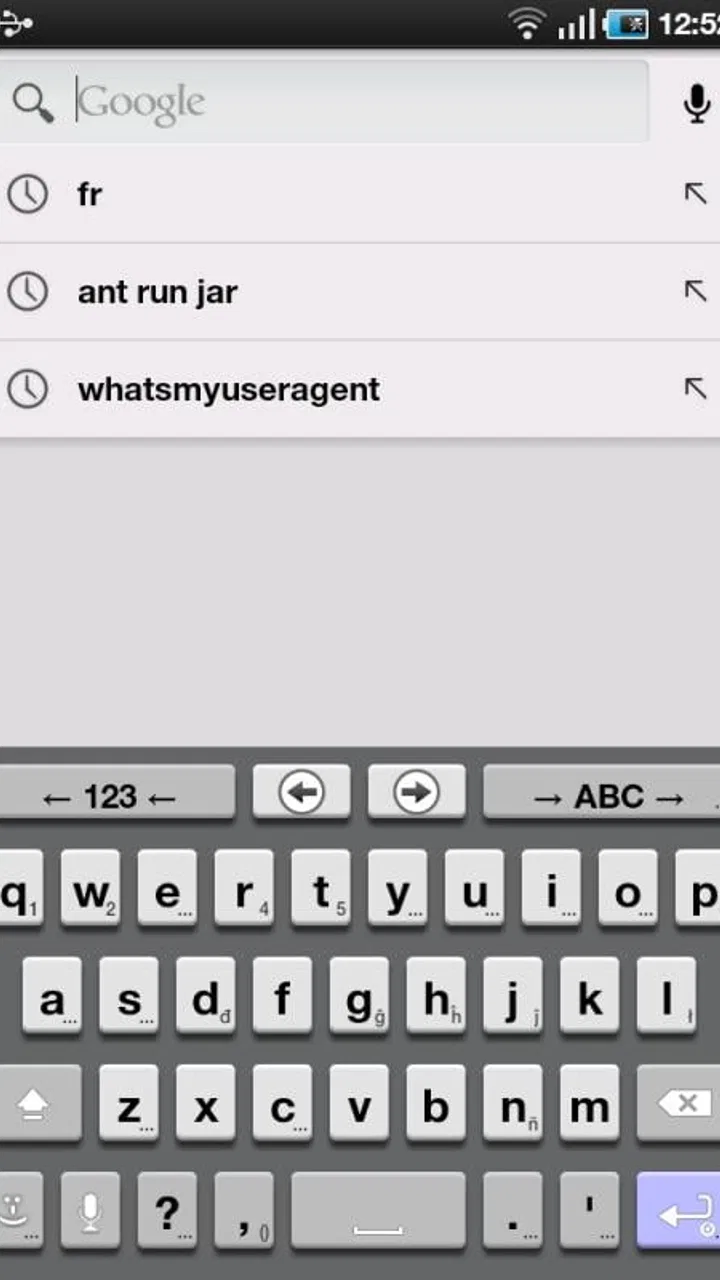
The main capability sounds simple, but a keyboard’s appearance affects how I approach typing. Classic PC Theme gives AnySoftKeyboard a more familiar desktop-computer feel. The keys appear designed to evoke older physical keyboards rather than a modern phone interface, so the screen feels less like a soft, floating control panel and more like a compact version of a conventional typing surface.
That change does not make the phone keyboard physically tactile, of course. The screen still offers no real key travel, and the theme cannot create the mechanical feedback of pressing a plastic key. What it can do is improve visual recognition. When I glance down, the individual buttons feel more clearly separated, and the overall layout has a straightforward, utilitarian character. For someone who dislikes glossy, minimal, or heavily rounded mobile keyboard designs, that difference can make the keyboard feel more comfortable to use.
I also like that the theme does not ask me to learn a new typing method. My existing AnySoftKeyboard layout remains the foundation. The benefit comes from changing the visual layer, not from forcing a new arrangement or a new writing habit. That makes the theme easy to evaluate: if I like the old-school appearance, it earns a place on the phone; if I do not, removing or switching away from it does not require relearning how to type.
The strongest effect appears during longer text entry. For a quick search or a short reply, almost any readable keyboard can do the job. When I am writing a longer message, drafting notes, or entering text repeatedly throughout the day, the consistent block-like appearance gives the keyboard a more deliberate feel. It is a small change, but it can make the bottom half of the screen feel less visually distracting.
How I use it with AnySoftKeyboard
The first practical point is that Classic PC Theme belongs alongside AnySoftKeyboard rather than replacing it. I would install it only when AnySoftKeyboard is already the keyboard I intend to use. Thinking of it as an independent keyboard can lead to the wrong expectation, especially for someone who wants a full typing app with its own language tools, prediction system, or input methods.
Once the theme is available within the AnySoftKeyboard setup, the useful decision is whether its appearance suits the layout and screen size on the phone. I recommend checking the keyboard in the places where I type most often instead of judging it only from a setup screen. A theme can look appealing in isolation but feel crowded when the keyboard is displayed on a smaller phone, or it can look plain in a preview and become pleasantly clear during real typing.
My preferred way to test it is to open three different kinds of text fields: a short message, a longer note, and a form with numbers or punctuation. This reveals whether the old-school styling remains legible when the keyboard changes rows or presents less frequently used keys. It also shows whether the visual separation helps enough to justify giving up the look of a newer theme.
One useful workflow is to keep this theme for focused writing rather than treating it as a permanent choice. If I am composing a long email or entering notes, the classic appearance can make the keyboard feel calmer and more familiar. For a more modern-looking home screen or a heavily customized phone, I might switch to another AnySoftKeyboard theme when appearance consistency matters more than the retro computer style.
Another practical insight is that the theme’s value depends on the rest of the keyboard configuration. If the underlying AnySoftKeyboard layout is unfamiliar, changing the skin will not solve that problem. Likewise, if the device’s text field is cramped or the phone is being used in landscape mode, the theme cannot compensate for poor screen ergonomics. I treat the visual design as a refinement, not a fix for every typing issue.
The everyday situation where it makes the most sense
The best scenario for Classic PC Theme is regular text entry by someone who misses the visual clarity of a desktop keyboard. Imagine writing a work note on a phone during a commute, replying to several messages at a café, or entering a longer list while away from a computer. In those moments, I am not looking for animated effects or decorative graphics. I want the keys to look organized, familiar, and easy to distinguish at a glance.
That is where this theme feels most convincing. The classic PC idea gives the keyboard a practical identity. It reminds me of the layout I use on a physical computer without pretending that the phone has become a laptop. The result is especially suitable for users who type with deliberate taps and frequently look at the keyboard rather than relying entirely on muscle memory.
It can also suit a secondary device used for writing. On an older Android phone or a device kept for notes, messages, or basic communication, a restrained theme may feel more appropriate than a fashionable keyboard design. Since the app is free, experimenting with it does not require a purchase decision, and the Everyone rating makes it suitable for a broad household audience.
I would be less enthusiastic about it for someone who wants a dramatic visual overhaul. The theme’s strength is its focused old-school direction, not a collection of flashy personalization options. If the goal is colorful artwork, unusual backgrounds, animated effects, or a keyboard that matches a particular phone brand, another theme would probably be a better fit.
What improves during real typing
The most useful improvement is visual orientation. On a touch screen, I cannot feel the edges of a key in the way I can on a physical keyboard. A clearly defined, traditional-looking key design gives my eyes more structure to follow. That does not guarantee faster typing, but it can reduce the vague, flat appearance that some mobile keyboards have.
I also find the theme helpful when moving between phone and computer. The visual resemblance is not enough to reproduce desktop speed, yet it creates a familiar mental reference. I am less conscious of the keyboard as a decorative phone component and more focused on it as a compact text-entry tool. For users who spend much of the day switching between physical and virtual keyboards, that continuity may be more valuable than it first appears.
There is a subtle trade-off here. A classic computer-inspired appearance can make the keyboard feel more serious, but it may also make the screen look busier than an extremely minimal theme. Users who prefer large empty spaces, soft colors, or a very clean interface may interpret the same visual structure as dated or crowded. I consider that a matter of taste, but it is an important one because the theme’s entire purpose is visual.
The theme is also a good reminder that appearance cannot replace keyboard fundamentals. Autocorrection, language support, layout choices, and the behavior of the parent keyboard still determine much of the typing experience. Classic PC Theme can make AnySoftKeyboard more pleasant for me to look at, but it does not turn a layout I dislike into one I suddenly understand.
Where the trade-offs become clear
The biggest limitation is its dependence on AnySoftKeyboard. Someone using another keyboard app cannot reasonably expect this theme to transform that keyboard. A user who wants one self-contained installation should look for a full keyboard application with the desired classic styling already built in. This theme is better for people who are comfortable building their typing setup from a keyboard plus a compatible appearance add-on.
There is also a maintenance consideration. A dedicated theme has a narrower role than a complete keyboard app, so its usefulness rises and falls with the user’s satisfaction with AnySoftKeyboard. If the parent keyboard changes in a way I do not enjoy, the theme alone cannot preserve the entire experience. I would choose it because I like the combination, not because the theme can stand independently.
Screen size is another factor. On a compact display, a traditional key treatment may help separate buttons, but it can also make the keyboard feel dense. On a larger screen, the same style may have more room to breathe. I would not decide based on the theme name alone; I would test it with the phone held in the way I normally type, including one-handed use if that is my usual habit.
People who depend on advanced keyboard conveniences should also keep their expectations realistic. This is not the place to look for a new prediction engine, a special clipboard system, or an expanded productivity suite. Its contribution is the classic PC visual treatment. That focus is honest and useful, but it means the app will feel too limited if I am searching for a broad collection of tools.
Finally, the retro styling will not appeal to everyone. Some users may associate older computer keyboards with cramped layouts or an unfashionable interface. Others may enjoy exactly that sense of familiarity. I would not call the design universally better; I would call it more purposeful for a particular taste and typing routine.
Who gets the most from this small add-on
I recommend Classic PC Theme most strongly to existing AnySoftKeyboard users who want their keyboard to look more like a traditional computer input device. It is a good match for people who value clear key boundaries, prefer practical styling, and do a meaningful amount of text entry on their phones. It is also worth trying for anyone who finds modern mobile keyboard themes too decorative or visually vague.
It may be useful for older family members who are more comfortable with familiar computer imagery, although the actual result will still depend on the phone’s screen size and the person’s vision. In that situation, I would test readability directly rather than assuming that a classic look automatically means larger or easier keys. The theme changes appearance; it should not be mistaken for a dedicated accessibility solution.
Students, writers, and people who use a phone as a lightweight note-taking device may appreciate the focused design. I can imagine keeping it selected during a period of frequent writing, then comparing it with another AnySoftKeyboard theme when I want a different visual mood. Because it is free, that kind of trial is easy, and the modest install footprint implied by its focused role makes sense for an add-on rather than a full platform.
I would skip it if I do not use AnySoftKeyboard, if I want a complete keyboard app in one package, or if I strongly prefer modern, colorful, or highly animated designs. I would also skip it if my main problem is typing accuracy caused by layout, prediction, or language support. In those cases, I need to address the keyboard engine or configuration first; a visual theme will not solve the underlying issue.
My recommendation after using it
Classic PC Theme succeeds because it does not overreach. It takes one idea—the appearance of old computer keys—and applies it to AnySoftKeyboard in a way that can make phone typing feel more familiar and visually grounded. I appreciate that clarity. There is no need to search through a long list of unrelated functions to understand what it is for.
At the same time, I would only recommend it as part of a compatible AnySoftKeyboard setup. Its value is not in replacing the keyboard, adding a new writing system, or delivering a complete productivity experience. Its value is in making the keyboard I already use feel closer to a traditional desktop tool. That is a narrow benefit, but for the right user it is a meaningful one.
With a 5.0 average and more than ten thousand installs, it has found a small but enthusiastic audience. I would not use those figures as a reason to install it blindly; the visual style is too personal for that. Instead, I would try it during a real writing session, check short messages and longer notes, and decide whether the clearer classic presentation feels better on my particular screen.
My final view is favorable, with a clear condition: choose it for the focused visual change, not for features it was never designed to provide. If the old-school PC look makes AnySoftKeyboard easier or more enjoyable for you to approach, this free theme is a sensible, low-risk customization. If you need a full keyboard replacement or modern customization tools, another option will serve you better.
FAQs for Classic PC Theme
01What is Classic PC Theme, and what does it do?
Classic PC Theme is an Android customization app designed to give your phone a traditional desktop-computer appearance. After installing it, you can apply a familiar classic-style interface with themed icons, wallpapers, menus, and visual elements inspired by older PC operating systems. It is mainly intended for users who enjoy nostalgic designs and want to change the look of their device without replacing the entire Android system.
02Is Classic PC Theme compatible with every Android phone?
Compatibility can vary depending on your Android version, device manufacturer, launcher, and screen resolution. On some phones, the theme may work through a supported launcher, while other devices may display only certain elements such as wallpapers or icons. Before downloading, check the app’s Google Play listing for the required Android version and supported features, since the complete desktop-style appearance may not be available on every device.
03Does Classic PC Theme change the phone’s operating system or only its appearance?
Classic PC Theme generally changes the visual presentation of your device rather than replacing Android itself. It should not turn your phone into a real desktop computer or provide a complete PC operating system. Depending on how the app works with your launcher, it may modify icons, backgrounds, widgets, or interface styling. Your regular Android settings, applications, files, and system functions remain in place.
04Is Classic PC Theme free to download, and are there advertisements?
The app may be available to download at no initial cost, but free versions of customization applications commonly include advertising, optional purchases, or limitations on certain themes and features. The exact pricing and advertising experience can change with updates. We recommend checking the current store description and the in-app purchase section before installing, especially if you prefer a completely ad-free experience or want access to every customization option.
05Is Classic PC Theme safe to install and what permissions might it request?
As with any personalization app, you should review the developer information, recent user feedback, update history, and requested permissions before downloading Classic PC Theme. A theme app may request access related to notifications, wallpapers, storage, or launcher features, depending on its design. Avoid granting permissions that seem unrelated to customization, and install it only from an official app store to reduce the risk of modified or unsafe versions.
Pros
- Recreates a familiar classic desktop look for nostalgic users.
- Lightweight design should have minimal impact on device performance.
- Simple visual style keeps icons and menus easy to recognize.
- Useful for customizing the appearance of compatible Android devices.
- Offers a distinct alternative to modern
- flat interface themes.
Cons
- May require a compatible launcher or customization app to work properly.
- Some features may be limited by Android version or device manufacturer.
- Classic graphics can look dated on high-resolution modern screens.
- Theme settings may not apply consistently across every app.
- Could include ads or extra permissions depending on the downloaded version.

Classic PC Theme
Gallery